Office Occupancy Monitoring & Space Utilization: The 2026 Guide to Workplace People Counting
Hybrid work changed the question facilities teams ask. It used to be “how many desks do we need?” Now it is “how many people actually come in, when, and which spaces do they use?” Badge data cannot answer that well, because people tailgate, forget cards and badge in once a day no matter how long they stay. Office occupancy monitoring fills that gap with sensors that count people in real time, so you can right-size real estate, cut energy waste and design a workplace people want to use.
This guide explains how workplace people counting works, which sensors fit which spaces, the metrics that matter, and how to roll it out without upsetting employees. If you are new to the topic, start with our complete guide to people counting systems.
What Is Office Occupancy Monitoring?
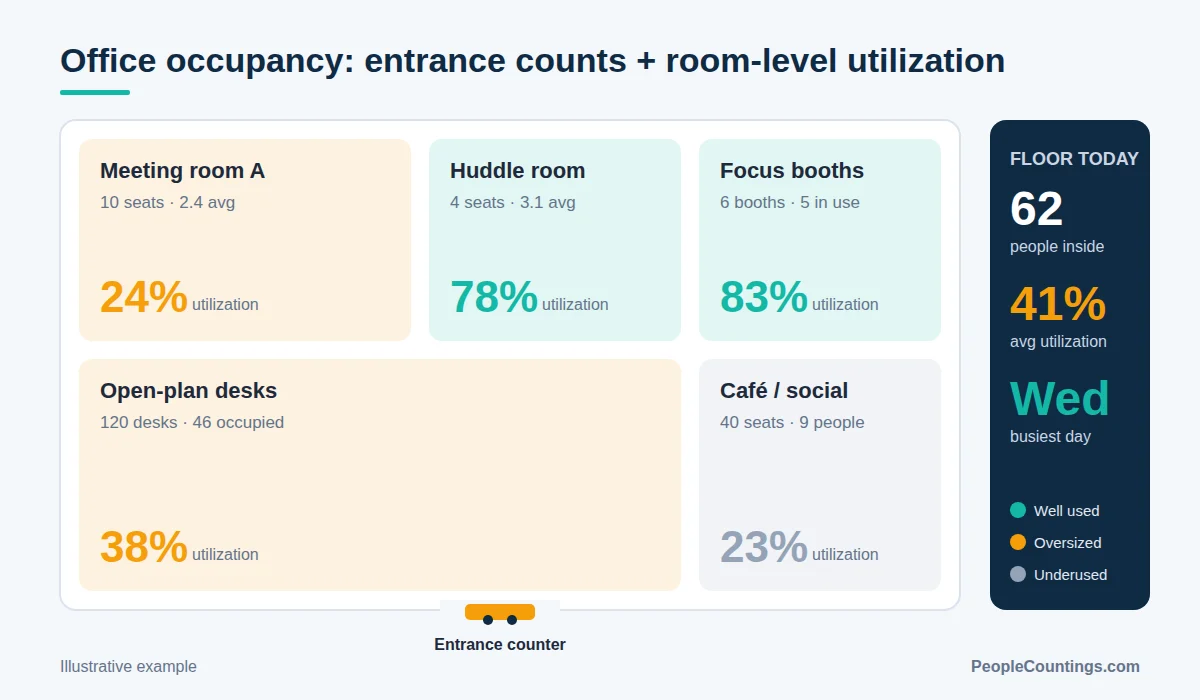
Office occupancy monitoring is the continuous measurement of how many people are in a building, floor, zone or room at any moment. It combines two kinds of data:
- Entrance counts – sensors over doors and turnstiles count people in and out, giving building or floor occupancy (ins minus outs).
- Space utilization – sensors inside meeting rooms, desks and open areas show whether a space is occupied and by how many people.
Together they answer the questions that drive workplace strategy: peak vs. average attendance, which days are busiest, how often a 12-person room hosts two people, and which floors could be consolidated.
Why Badge Data Is Not Enough
Access control logs are a useful starting point, but they consistently misstate real occupancy:
- Tailgating – one badge swipe often lets several people through.
- No exit data – most systems only log entry, so you cannot tell how long people stay or when the floor empties.
- Visitors and contractors are frequently missing from the data.
- No room-level detail – a badge tells you someone is in the building, not that the boardroom is empty for the third day running.
Dedicated occupancy sensors measure the people, not the cards, which is why most enterprise workplace programs layer them on top of access control.
Sensor Options for the Workplace
No single sensor is ideal everywhere. The table below summarizes the usual choices.
| Sensor type | Best for | Strengths | Watch-outs |
|---|---|---|---|
| Overhead 3D stereo / ToF | Building and floor entrances | High directional accuracy, handles groups, anonymous | Needs ceiling mounting and power/PoE |
| LiDAR | Large lobbies, atriums, open-plan zones | Wide coverage, works in any lighting, no images | Higher unit cost |
| Thermal sensors | Meeting rooms, small zones | Privacy-friendly, counts people (not just presence) | Lower resolution in very large areas |
| PIR / under-desk sensors | Desk occupancy | Cheap, battery-powered, easy to deploy at scale | Presence only, not head counts |
| Radar (mmWave) | Rooms and zones | Detects still people, no optics | Tuning needed in cluttered spaces |
| Wi-Fi / BLE analytics | Rough building trends | Uses existing network | Indirect, affected by device randomization |
For a deeper technical comparison, see People Counting Sensors Compared 2026.
The Workplace Metrics That Matter
1. Peak and average occupancy
Plan capacity around the realistic peak (for example, the 90th percentile day), not the rare all-hands day. The gap between peak and average shows how much flexibility you have.
2. Utilization rate
Average occupancy divided by capacity, for a building, floor or room. Many offices discover utilization well below half of design capacity after hybrid policies settle in.
3. Room right-sizing ratio
Average attendees divided by room capacity. If most meetings in 10-seat rooms have two or three people, convert some of them into small huddle rooms or focus booths.
4. Ghost bookings
Rooms that are booked in the calendar but never occupied. Linking sensors to the booking system lets you auto-release them after a no-show period.
5. Day-of-week and time-of-day patterns
Tuesday–Thursday peaks are common in hybrid offices. Knowing them helps with cleaning schedules, catering, HVAC run-times and team “anchor days”.
Business Benefits
- Real estate savings – evidence for consolidating floors, subletting or negotiating a smaller lease at renewal.
- Energy efficiency – occupancy-driven HVAC and lighting (demand-controlled ventilation) avoids heating, cooling and lighting empty zones.
- Better employee experience – live availability maps help people find a free room or quiet desk quickly.
- Cleaning and services on demand – clean what was used, not everything on a fixed timetable.
- Safety – live headcounts support evacuation and maximum-occupancy rules.
To build the financial case, use the framework in our people counting ROI guide.
How to Roll Out Occupancy Monitoring
- Define the decisions. Are you planning a lease renewal, a redesign, or energy savings? The decision determines which spaces you need to measure.
- Start with entrances. Floor-level counts are the cheapest way to get a reliable baseline.
- Pilot one floor in detail. Add room and desk sensors to a representative floor for 6–8 weeks.
- Integrate. Connect the data to your workplace app, room booking, BMS/HVAC and BI tools through APIs.
- Communicate early. Tell employees what is measured, why, and what is not collected.
- Scale and review. Expand to other sites once the pilot proves value, and review metrics monthly.
Privacy: Count People, Not Persons
Employee trust is the make-or-break factor. Choose sensors that process data at the edge and only send anonymous counts, avoid storing images, and involve works councils or employee representatives where required. In Europe, align the program with GDPR principles like data minimization and purpose limitation. Our GDPR and AI privacy guide covers this in detail.
Frequently Asked Questions
How accurate are office occupancy sensors?
Overhead 3D and LiDAR entrance counters from established vendors commonly quote accuracy in the high 90s percent under proper installation. Presence sensors such as PIR are reliable for “occupied or not” but do not give head counts.
Can occupancy data identify individual employees?
Not with privacy-by-design sensors. 3D, thermal, LiDAR and radar devices output counts, not identities. Avoid solutions that store video or link counts to badge IDs unless you have a clear legal basis.
How long should a pilot run?
Six to eight weeks is usually enough to capture weekly patterns and the effect of holidays or policy changes.
Does occupancy monitoring work with existing building systems?
Most modern platforms provide APIs, MQTT or BACnet integrations for building management systems, room booking tools and BI dashboards.
Next Steps
Office occupancy monitoring turns guesswork about hybrid attendance into numbers you can plan around. Begin with entrance counts, pilot detailed sensors on one floor, and keep privacy at the center of the program. Compare vendors in our 2026 Power List of the top 50 people counting providers, or request a free quote to get matched with suitable solutions.